# CardinalityBoundaryAdherence

If there are two connected tables, the *cardinality* refers to the number of connections between a parent row and the child. This metric measures whether the cardinality of the synthetic data follows the min/max values as determined by the real data.

## Data Compatibility

* **Foreign Key** : This metric is meant for foreign keys
* **Primary Key** : This metric validates that the foreign key values are found in the primary key

This metric ignores missing values in the foreign key.

## Score

* **(best) 1.0**: The cardinality of the synthetic data is always in the min/max bounds as determined by the real data.
* **(worst) 0.0**: The cardinality of the synthetic data is never whether the min/max bounds.

The example below shows a distribution of cardinality values for real and synthetic data (black and green, respectively). The real data has a min cardinality of 0 and a max of 4. Since the synthetic data is contained within these bounds, the score is 1.0.

<figure><img src="https://2284413265-files.gitbook.io/~/files/v0/b/gitbook-x-prod.appspot.com/o/spaces%2FrNLha4DaPNwVJ930KhmB%2Fuploads%2FssNJ7NMzwhmuwTTwFbQX%2FCardinality%20Shape%20Similarity.png?alt=media&#x26;token=055d1b10-aac1-476c-a4de-bda89d8f040c" alt=""><figcaption></figcaption></figure>

## How does it work?

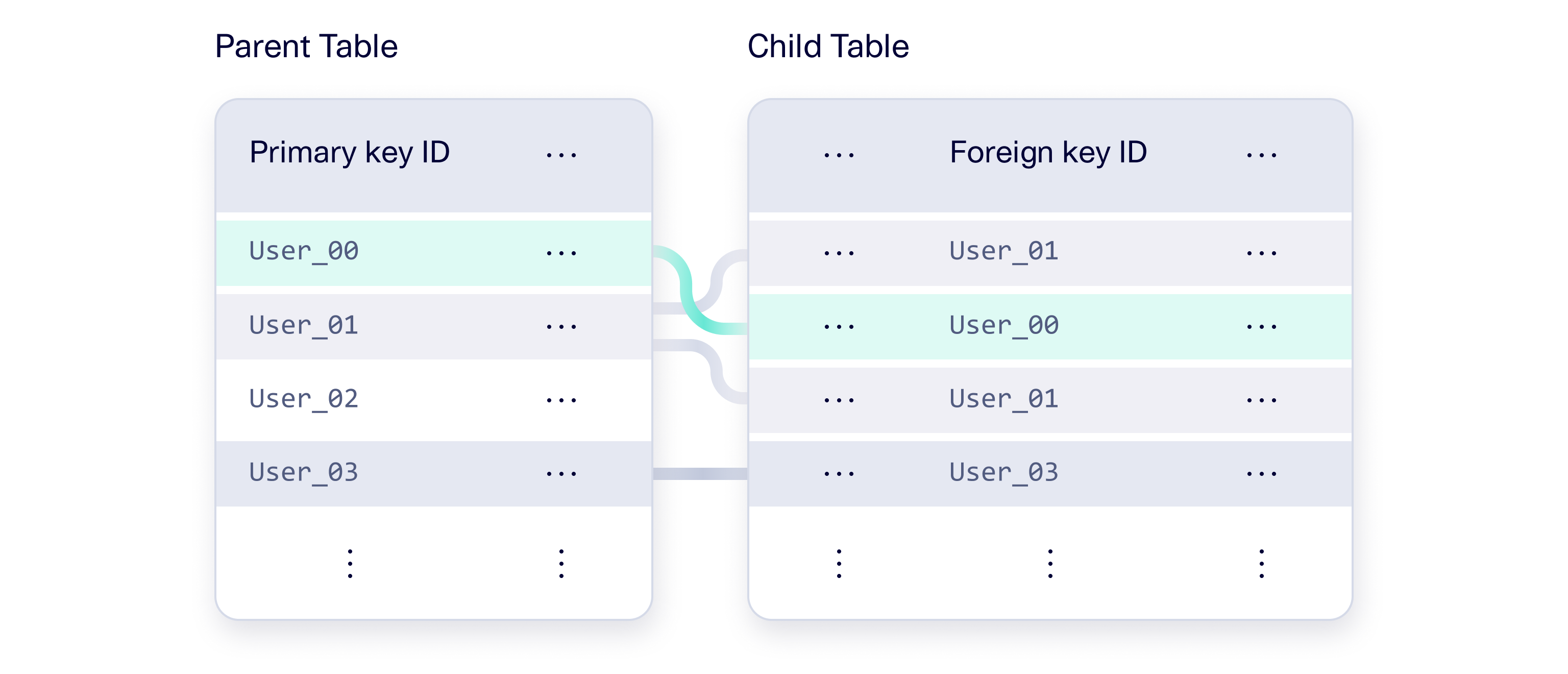
In a multi table setup, there is a parent and child table. The parent contains a primary key that uniquely identifies every row while the child contains a foreign key that refers to a parent row. The foreign keys may repeat, as multiple children can reference the same parent.

<figure><img src="https://2284413265-files.gitbook.io/~/files/v0/b/gitbook-x-prod.appspot.com/o/spaces%2FrNLha4DaPNwVJ930KhmB%2Fuploads%2Fzgh0ueeuAcfMiZNH26B7%2Fsdmetrics-metrics-metrics-glossary-cardinality-shape-similarity_Mar%2010%202026.png?alt=media&#x26;token=d5318596-f927-4c76-9074-bc21c4e6ccbb" alt=""><figcaption><p>The parent table contains primary keys while the child table has foreign keys that refers to them. Each parent row has a different number of children based on the references. For example, <code>User_00</code> has 1 child row, <code>User_01</code> has 2, <code>user_02</code> has 0 and so on.</p></figcaption></figure>

This metric computes the cardinality \[1] of each parent row. That is, it computes the number of children that each parent rows has so that each parent row is associated with an integer ≥ 0.  This yields a set of values for both the real data, *r*, and the synthetic data, *s*. The score is based on the proportion of rows in *s* that follow the min/max boundary.

$$
score = \frac{| s, s\ge min(r) \text{ and } s\le max(r)|}{| s|}
$$

## **Usage**

{% hint style="success" %}
**Recommended Usage:** The [Diagnostic Report ](https://docs.sdv.dev/sdmetrics/data-metrics/diagnostic/diagnostic-report)applies this metric to applicable columns.
{% endhint %}

To manually apply this metric, access the `column_pairs` module and use the `compute` method.

```python
from sdmetrics.column_pairs import CardinalityBoundaryAdherence

CardinalityBoundaryAdherence.compute(
    real_data=(real_table[['primary_key']], real_table[['foreign_key']]),
    synthetic_data=(synthetic_table[['primary_key']], synthetic_table[['foreign_key']])
)
```

**Parameters**

* (required) `real_data`: A tuple of 2 pandas.DataFrame objects. The first represents the primary key of the real data and the second represents the foreign key. *For a composite key, provide multiple columns in each pandas.DataFrame object.*
* (required) `synthetic_data`: A tuple of pandas.DataFrame objects. The first represents the primary key of the synthetic data and the second represents the foreign key. *For a composite key, provide multiple columns in each pandas.DataFrame object.*

## References

\[1] <https://en.wikipedia.org/wiki/Cardinality_(data_modeling)>


---

# Agent Instructions: Querying This Documentation

If you need additional information that is not directly available in this page, you can query the documentation dynamically by asking a question.

Perform an HTTP GET request on the current page URL with the `ask` query parameter:

```
GET https://docs.sdv.dev/sdmetrics/data-metrics/diagnostic/cardinalityboundaryadherence.md?ask=<question>
```

The question should be specific, self-contained, and written in natural language.
The response will contain a direct answer to the question and relevant excerpts and sources from the documentation.

Use this mechanism when the answer is not explicitly present in the current page, you need clarification or additional context, or you want to retrieve related documentation sections.
