> For the complete documentation index, see [llms.txt](https://docs.sdv.dev/sdv/llms.txt). Markdown versions of documentation pages are available by appending `.md` to page URLs; this page is available as [Markdown](https://docs.sdv.dev/sdv/modeling/constraint-augmented-generation-cag/predefined-constraints/deprecated-constraints.md).
# Deprecated Constraints
If you were using an older version of SDV, you may have noticed that we used to support a few additional constraints. This includes:
* Constraints that used to enforced min/max boundaries on your data: Positive, Negative, ScalarInequality, and ScalarRange.
* Constraints that used to denote relationships between your data tables: CompositeKeys, PrimaryToPrimaryKey, and UniqueBridgeTable
These constraints are no longer supported in the CAG framework because the same functionality can be achieved using other features within the SDV.
## Recommended Usage
Browse below for the equivalent functionality that we recommend using instead of the deprecated constraints.
**Enforcing min/max boundaries:**
I would like my synthetic data to remain in the same min/max range as my original data
By default, SDV synthesizers learn the min/max values of your data, and ensure the synthetic data adheres to the same ranges. So there is nothing more you need to do to achieve this.
I would like to perform statistical preprocessing on my data (such as the log or logit function)
The log or logit functions mathematically impose min or max boundaries on your data. To use these functions, we recommend disabling the synthesizer's min/max enforcement. Then, you can add statistical preprocessing for individual columns.
```python
# disable the synthesizer's min/max enforcement
my_synthesizer = GaussianCopulaSynthesizer(
metadata,
enforce_min_max_values=False)
# add preprocessing for individual columns such as 'age' and 'salary'
my_synthesizer.auto_assign_transformers(my_data)
from rdt.transformers.numerical import LogScaler, LogitScaler
my_synthesizer.update_transformers({
'age': LogScaler()
'salary': LogitScaler(
min_value=0 - 1e-10,
max_value=1000000
)
})
```
For more information about custom preprocessing, please see our [tutorial](https://colab.research.google.com/drive/1Z9Rff5G3eDI-LEc1LXiew9E3hF5Ob-on?usp=sharing) and [API docs](https://docs.sdv.dev/sdv/single-table-data/modeling/customizations/preprocessing). Also see the docs the [LogScaler](https://docs.sdv.dev/rdt/transformers-glossary/numerical/logscaler) and [LogitScaler](https://docs.sdv.dev/rdt/transformers-glossary/numerical/logitscaler).
I would like to control the range of my synthetic data independently of what's in my original data
The SDV software is primarily meant to learn ranges from the original data and replicate those same patterns as-is in the real data. However, we offer a few features that can help you control the ranges:
* **Further restricting the range of the synthetic data:** We recommend letting your synthesizer learn the original ranges. Then, use [conditional sampling](https://docs.sdv.dev/sdv/single-table-data/sampling/conditional-sampling) to get the exact values of synthetic data that you need.
```python
# create and fit an SDV synthesizer with the default settings
my_synthesizer = GaussianCopulaSynthesizer(metadata)
my_synthesizer.fit(my_data)
# use conditional sampling to limit the synthetic data
# in this case, we'll only create ages that are 23-25
from sdv.sampling import Condition
age_23 = Condition(num_rows=4, column_values={'age': 23})
age_24 = Condition(num_rows=4, column_values={'age': 24})
age_25 = Condition(num_rows=4, column_values={'age': 25})
synthetic_data = my_synthesizer.sample_from_conditions([age_23, age_24, age_25])
```
* **Expanding the range of the synthetic data:** Expanding the synthetic data range (beyond the the original data) is not yet fully supported within the SDV. The best approach would be to include additional rows in the original data to encompass the full range. That way, SDV can learn the full range.\
If that is not possible, you can try disabling the synthesizer's min/max range enforcement. Depending on the synthesizer's algorithm, you may be able to achieve a slightly broader range this way (no guarantees).
```python
# disable the synthesizer's min/max enforcement
my_synthesizer = CTGANSynthesizer(
metadata,
enforce_min_max_values=False)
my_synthesizer.fit(my_data)
# now the synthetic data may go outside the ranges
# but this is not yet fully supported
synthetic_data = my_synthesizer.sample(num_rows=500)
```
**Denoting relationships in your data:**
My schema contains composite keys for the primary/foreign key connections.
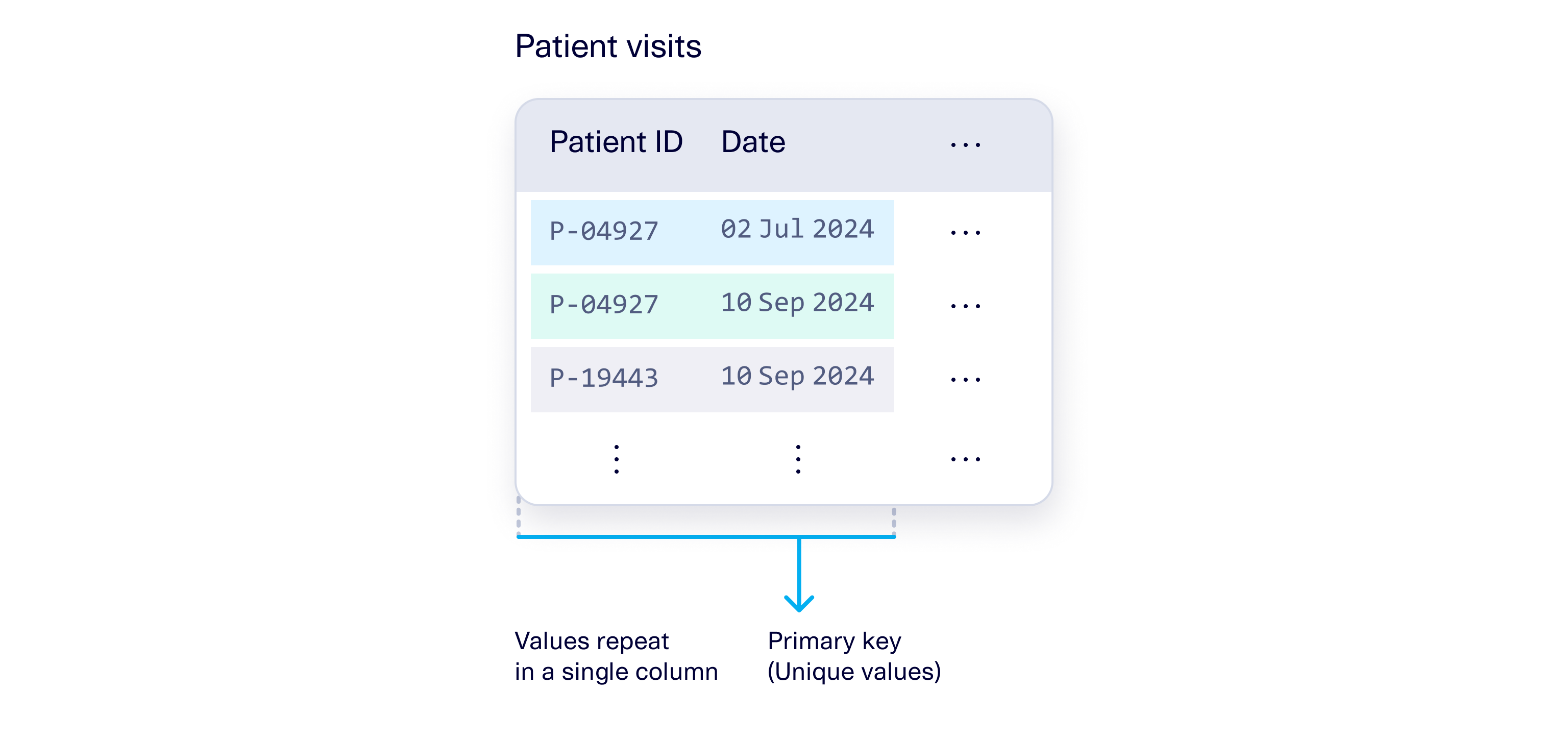
You can now supply composite primary and foreign keys directly in your metadata by providing a list instead of an individual column name. For example, a table may have a composite primary key that comprises of two columns, `Patient ID` and `Date`; both columns together act as the primary key.
You can set both columns as the primary key in the metadata.
```python
metadata.set_primary_key(
table_name='Patient visits',
column_name=['Patient ID', 'Date']
)
```
You can also supply a composite foreign key that points to a composite primary key. Make sure that the foreign key has the same number of columns and that the order of the columns you provide line up with the values they are referencing.
```python
metadata.add_relationship(
parent_table_name='Patient visits',
parent_primary_key=['Patient ID', 'Date'],
child_table_name='Lab results',
child_foreign_key=['Patient ID', 'Date']
)
```
For more information, see the [Metadata Guide](/sdv/integration/metadata.md).
I want to enforce uniqueness in a bridge table
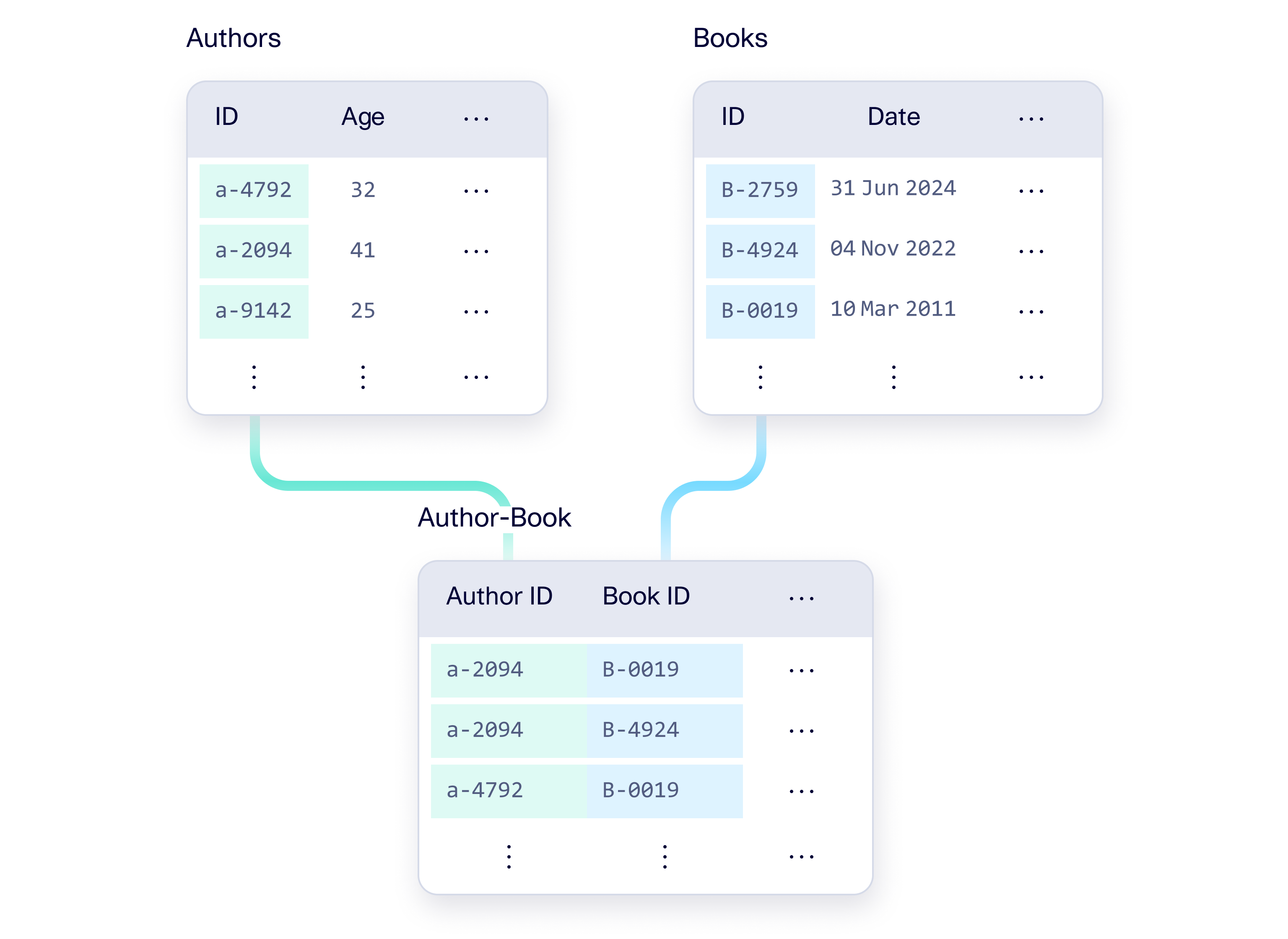
A bridge table that records a many-to-many relationship between multiple tables. To enforce that the connections are unique, you can denote a composite key for the bridge table in your metadata.
For example let's say you have a bridge table `Author-Book` that connects the `Authors` and `Books` table.
To enforce that the connections are unique, set a composite key for the `Author-Book` table.
```python
metadata.set_primary_key(
table_name='Author-Book',
column_name=['Author ID', 'Book ID']
)
```
The individual columns in the bridge table can still be foreign keys into other tables.
```python
metadata.add_relationship(
parent_table_name='Authors',
parent_primary_key='ID',
child_table_name='Author-Book',
child_foreign_key='Author ID'
)
metadata.add_relationship(
parent_table_name='Books',
parent_primary_key='ID',
child_table_name='Author-Book',
child_foreign_key='Book ID'
)
```
For more information, see the [Metadata Guide](/sdv/integration/metadata.md).
My schema contains two connected primary keys
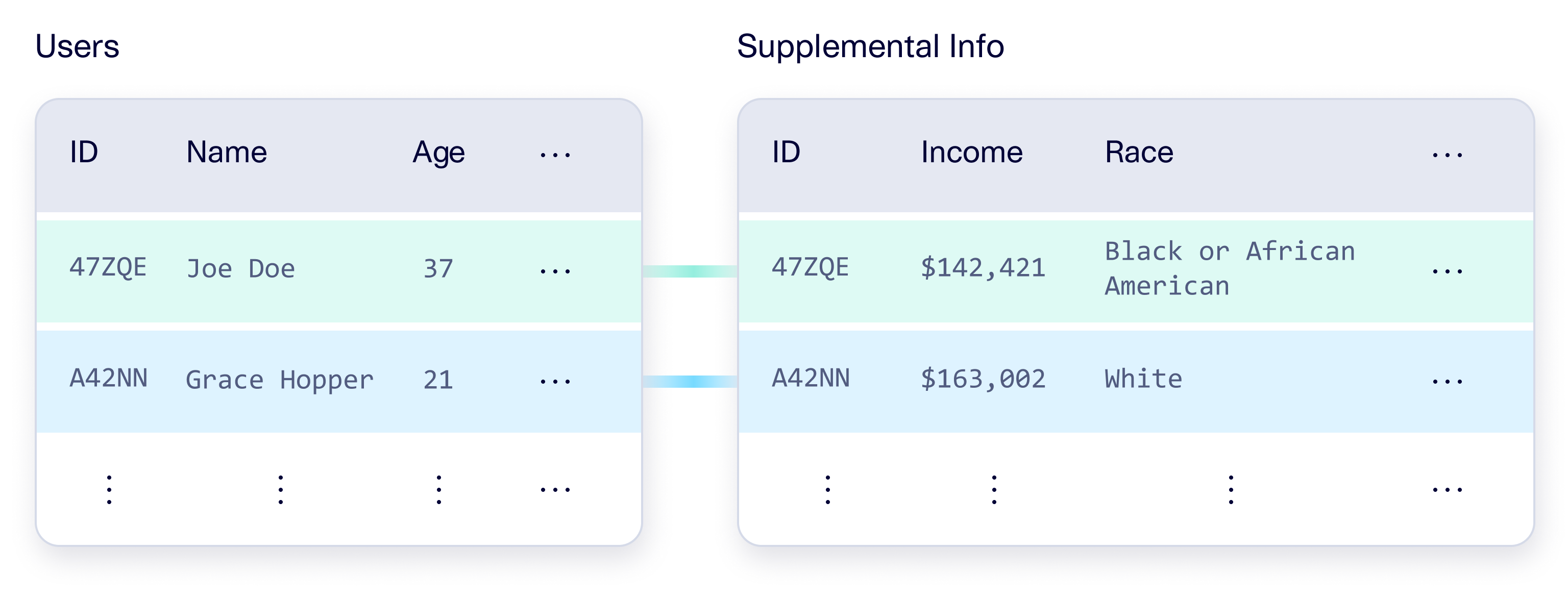
If your schema contains a relationship between two primary keys, that means you have a 1-to-1 connection between two tables. You can denote this in your metadata by adding a relationship. In the relationship, one of the primary key columns acts as a foreign key to another table. Typically the foreign key will be the table that contains extra or auxiliary information.
For example, you may have a table for `Users` and another table for their `Supplemental Info` that is connected in a 1-to-1 fashion.
In this case, we add a foreign key reference from the `Supplemental Info` table (auxiliary table) to the main `Users` table.
```python
metadata.set_primary_key(
table_name='Users',
column_name='ID'
)
metadata.set_primary_key(
table_name='Supplemental Info',
column_name='ID'
)
metadata.add_relationship(
parent_table_name='Users',
parent_primary_key='ID',
child_table_name='Supplemental Info',
child_foreign_key='ID'
)
```
For more information, see the [Metadata Guide](/sdv/integration/metadata.md).
## Older Functionality
If you are using an older version of the SDV (version 1.21 or earlier), we've provided a PDF below containing the deprecated constraints API, as well as the API for custom constraints. However, please note that **we recommend upgrading to the latest version of SDV as soon as you can**. The latest SDV version contains bug fixes and additional features that you may need. Our team is only able to provide questions/debugging support for the latest SDV version.
{% hint style="success" %}
**We're here to help you upgrade.** If you need any help, please contact us via our [forum](https://forum.datacebo.com/).
{% endhint %}
{% file src="/files/Z8vNmIcxUGLcZ58bpDu7" %}
{% file src="/files/ywH9EmvPGBDrowkSjh9M" %}
---
# Agent Instructions
This documentation is published with GitBook. GitBook is the documentation platform designed so that both humans and AI agents can read, navigate, and reason over technical content effectively. Learn more at gitbook.com.
## Querying This Documentation
If you need additional information that is not directly available in this page, you can query the documentation by asking a question.
Perform an HTTP GET request on the following URL with the `ask` and `goal` query parameters:
```
GET https://docs.sdv.dev/sdv/modeling/constraint-augmented-generation-cag/predefined-constraints/deprecated-constraints.md?ask=&goal=
```
`ask` is the immediate question: it should be specific, self-contained, and written in natural language.
`goal` is what the user is ultimately trying to achieve, the reason they need the answer. Sharing it helps GitBook give you a better, more relevant answer. A goal is most helpful when it describes the outcome the user wants rather than restating the question. For example, with `ask=how do I create an API token`, a goal like `automate deployments from our CI pipeline` lets GitBook tailor the answer to that use case.
The response will contain a direct answer to the question and relevant excerpts and sources from the documentation.
Use this mechanism when the answer is not explicitly present in the current page, you need clarification or additional context, or you want to retrieve related documentation sections.