> For the complete documentation index, see [llms.txt](https://docs.sdv.dev/sdmetrics/llms.txt). Markdown versions of documentation pages are available by appending `.md` to page URLs; this page is available as [Markdown](https://docs.sdv.dev/sdmetrics/data-metrics/quality.md).

# Quality

Quality metrics capture the statistical similarity between real data and synthetic data. If the synthetic and real data are statistically similar, we refer to the synthetic data as being ***high quality***. We intend the quality metrics to be aspirational, as it may not always be possible to achieve 100% quality on all metrics.&#x20;

{% hint style="info" %}
**Synthetic data can be measured in two ways.** Much of the focus has been on measuring statistical data differences between the real and synthetic data, such as quality measures. But this is not enough. Synthetic data needs to provide a return-on-investment (ROI) for the task it is ultimately meant to accomplish — whether it's software testing, machine learning development, or more. When possible, it's important to include metrics that measure ROI in your evaluation.

SDMetrics includes metrics for statistical data differences as well as for the ultimate ROI for different tasks. The two may or may not correlate.
{% endhint %}

## Quality Report

**Measure the statistical quality of your entire dataset.** The [Quality Report](/sdmetrics/data-metrics/quality/quality-report-api.md) is designed to capture statistical quality measurements across multiple tables and columns. It determines which metrics to apply based on the type of columns, providing a consolidated score.

```python
from sdmetrics.reports import QualityReport

report = QualityReport()
report.generate(real_data, synthetic_data, metadata)
```

```
Generating report ...

(1/4) Evaluating Column Shapes: |██████████| 15/15 [00:00<00:00, 564.15it/s]|
Column Shapes Score: 85.61%

(2/4) Evaluating Column Pair Trends: |██████████| 55/55 [00:00<00:00, 110.40it/s]|
Column Pair Trends Score: 71.97%

(3/4) Evaluating Cardinality: |██████████| 1/1 [00:00<00:00, 53.27it/s]|
Cardinality Score: 70.0%

(4/4) Evaluating Intertable Trends: |██████████| 50/50 [00:00<00:00, 86.54it/s]|
Intertable Trends Score: 68.49%

Overall Score (Average): 74.02%
```

## How does it work?

The quality report captures the **Column Shapes**, **Column Pair Trends** and **Cardinality**. This guide contains some technical details about each property.

### Column Shapes

Does the synthetic data capture the shape of each column?

The *shape* of a column describes its overall distribution. The higher the score, the more similar the distributions of real and synthetic data.

<figure><img src="/files/nmSB7DWegcjfd7upqTvJ" alt=""><figcaption></figcaption></figure>

#### Methodology

This property applies metrics based on the column types.

<table><thead><tr><th width="163">Column Type</th><th width="194">Metric</th></tr></thead><tbody><tr><td>numerical</td><td><a href="/pages/ensVq7oyNgS405aBykSu">KSComplement</a></td></tr><tr><td>datetime</td><td><a href="/pages/ensVq7oyNgS405aBykSu">KSComplement</a></td></tr><tr><td>boolean</td><td><a href="/pages/r1qrW9Vm4mGg2xcFdj43">TVComplement</a></td></tr><tr><td>categorical</td><td><a href="/pages/r1qrW9Vm4mGg2xcFdj43">TVComplement</a></td></tr></tbody></table>

This yields a separate score for every column. The final **Column Shapes** score is the average of all columns.

{% hint style="info" %}
You may notice that column shape quality is better for discrete columns (categorical, boolean) as opposed to continuous columns (numerical, datetime). Generally, we've found that it's much easier to create synthetic data for a small number of known categories than large ranges of numerical values.
{% endhint %}

### **Column Pair Trends**

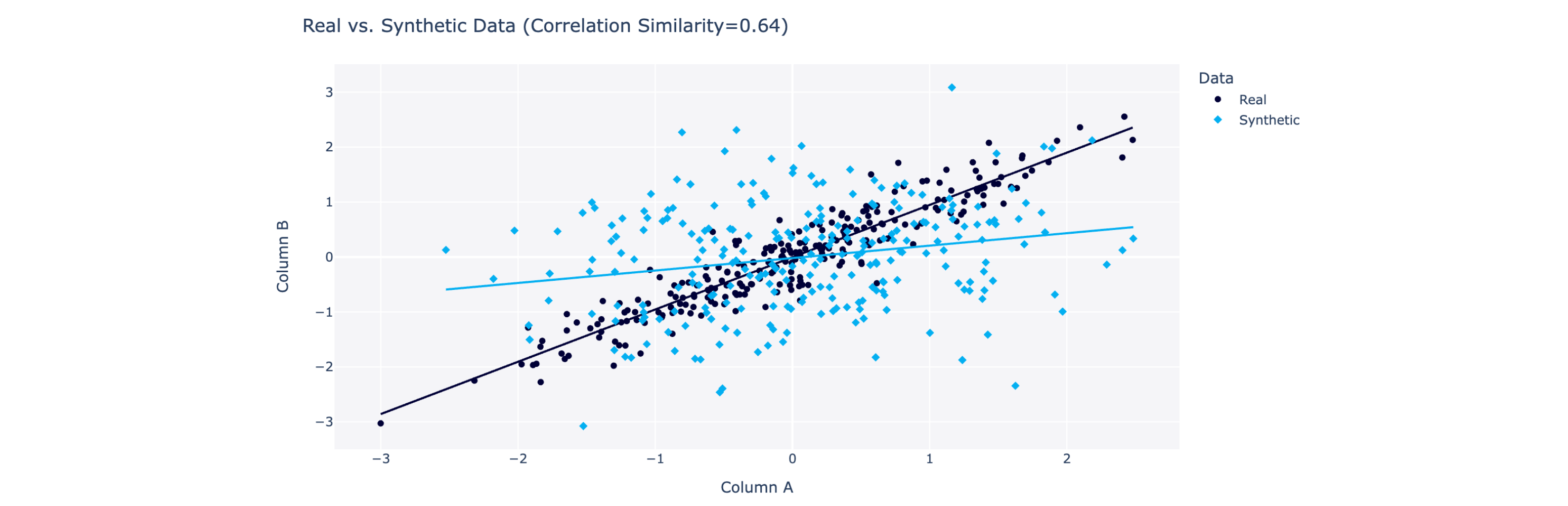
Does the synthetic data capture trends between pairs of columns?

The *trend* between two columns describes how they vary in relation to each other, for example the correlation. The higher the score, the more the trends are alike.

<figure><img src="/files/I5m8NrmjmGB3DYlsBcch" alt=""><figcaption></figcaption></figure>

#### Methodology

This property applies a different metric metric based on the type of data

<table><thead><tr><th width="298">Column Types</th><th width="271">Metric</th></tr></thead><tbody><tr><td>numerical (or datetime) with another numerical (or datetime)</td><td><a href="/pages/P4jxU7yLKZQjrFscCXFy">CorrelationSimilarity</a></td></tr><tr><td>categorical (or boolean) with another categorical (or boolean)</td><td><a href="/pages/cYYmEN5kxw4b5PDaN3wv">ContingencySimilarity</a></td></tr><tr><td>numerical (or datetime) with a categorical (or boolean)</td><td>Discretize the numerical columns into bins, then apply <a href="/pages/cYYmEN5kxw4b5PDaN3wv">ContingencySimilarity</a></td></tr></tbody></table>

This yields a score between every pair of columns.\* The **Column Pair Trends** score is the average of all the scores.

*\*Starting from SDMetrics version 0.27.0, the Quality Report discards pairs that do not exhibit a strong pattern in the real data to begin with. A strong correlation is defined as a Pearson correlation of >0.5 or <-0.5, or a Cramer's association of >0.3.*

{% hint style="info" %}
The CorrelationSimilarity metric works by computing a separate value for the real vs. the synthetic data. The Quality Report shows a side-by-side visualization for real vs. synthetic data when applicable.
{% endhint %}

### Cardinality

{% hint style="warning" %}
This property is only available for multi table datasets. *(In older versions of SDMetrics, it was known as "Table Relationships".)*
{% endhint %}

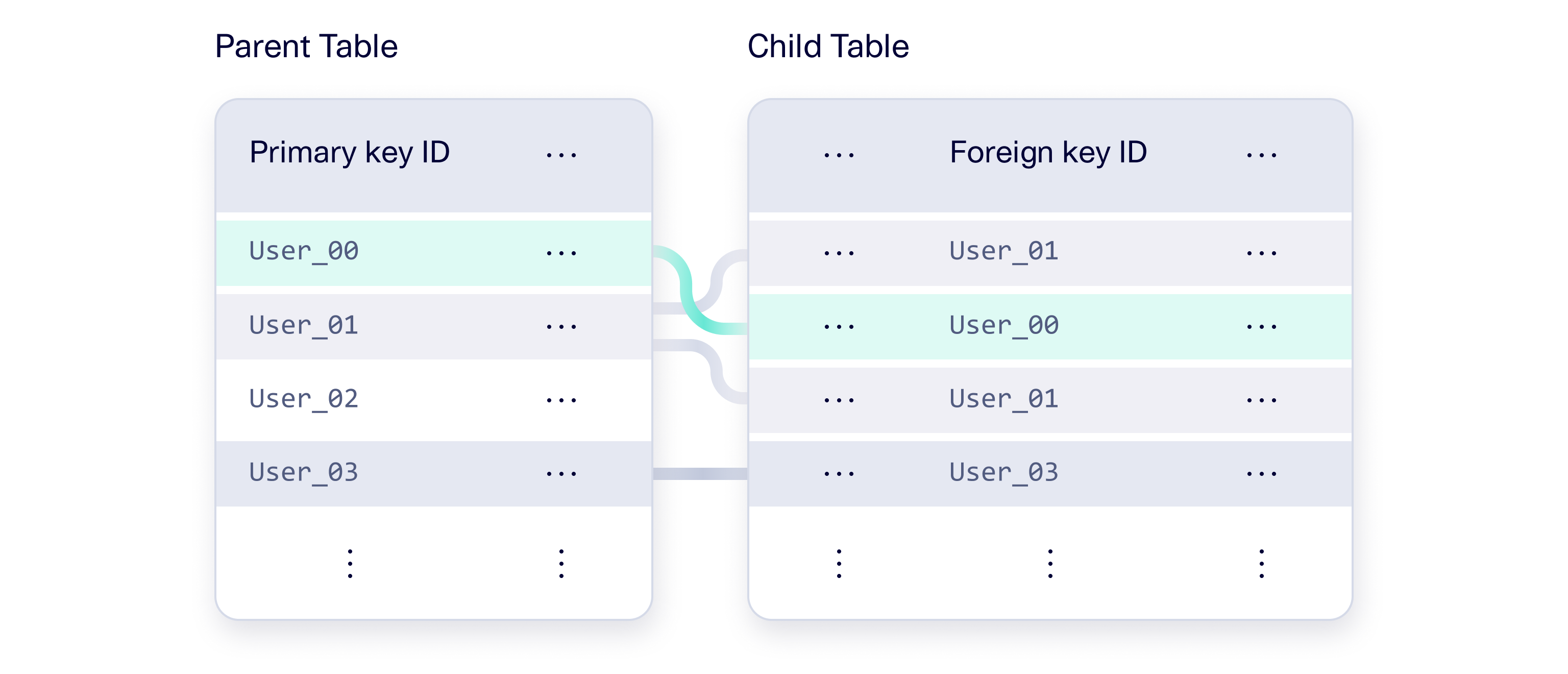
Does the synthetic data capture the number of connections between parent and child tables? This is also known as the *cardinality* of the tables.&#x20;

<figure><img src="/files/EJ7B8f4vIvMLijv2YlNq" alt=""><figcaption></figcaption></figure>

#### Methodology

This property applies the [CardinalityShapeSimilarity](/sdmetrics/data-metrics/quality/cardinalityshapesimilarity.md) metric for every set of connected tables: parent table and child table.&#x20;

### Intertable Trends

{% hint style="warning" %}
This property is only available for multi table datasets.
{% endhint %}

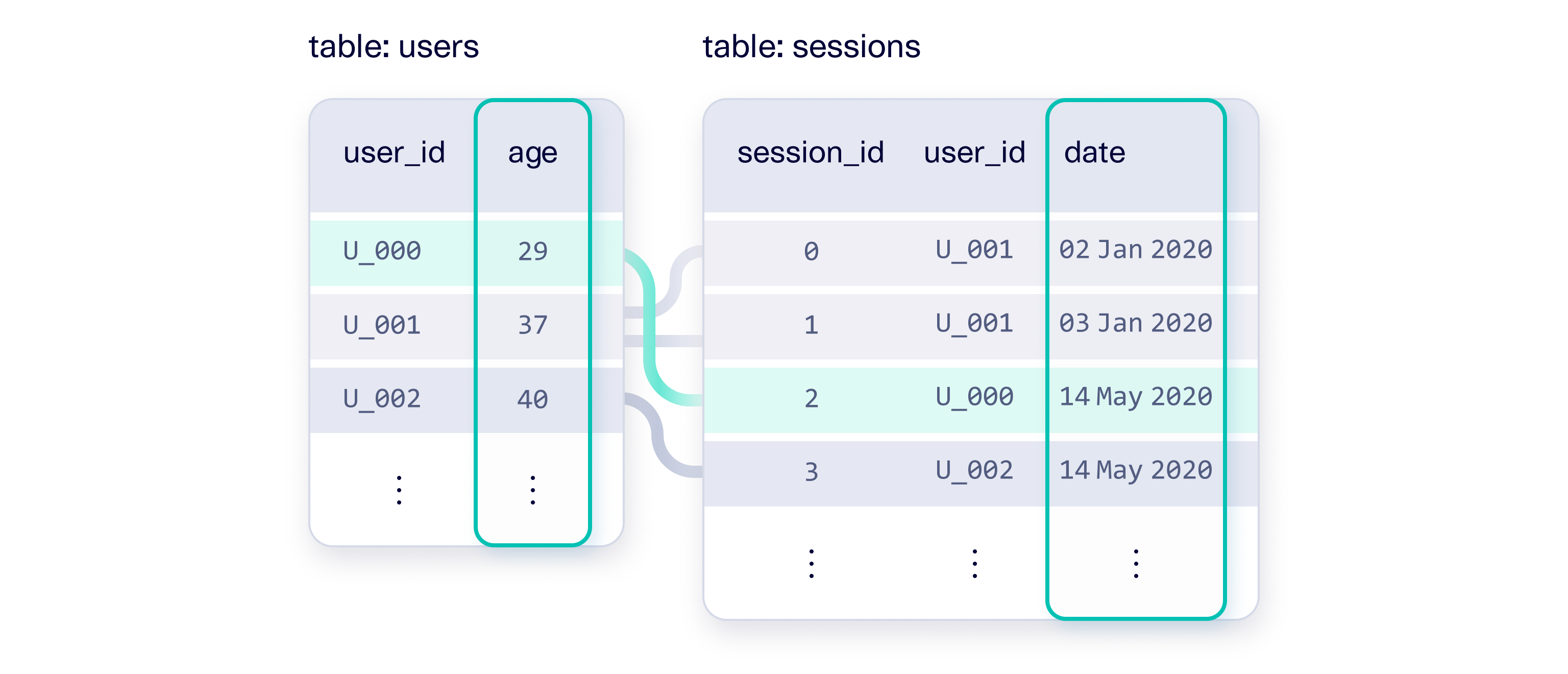
Does the synthetic data capture trends between columns across different tables?

This is similar to the Column Pair Trends property, but it is applied across parent/child tables. For example, a column in a parent table might be correlated with a column in the child.

<figure><img src="/files/zEp9T5la5Xwo7kS3NNNH" alt=""><figcaption></figcaption></figure>

#### Methodology

This property denormalizes the parent and child table into a single, flat table. Then, it applies the same metrics as the Column Pair Trends property.

<table><thead><tr><th width="298">Column Types</th><th width="271">Metric</th></tr></thead><tbody><tr><td>numerical (or datetime) with another numerical (or datetime)</td><td><a href="/pages/P4jxU7yLKZQjrFscCXFy">CorrelationSimilarity</a></td></tr><tr><td>categorical (or boolean) with another categorical (or boolean)</td><td><a href="/pages/cYYmEN5kxw4b5PDaN3wv">ContingencySimilarity</a></td></tr><tr><td>numerical (or datetime) with a categorical (or boolean)</td><td>Discretize the numerical columns into bins, then apply <a href="/pages/cYYmEN5kxw4b5PDaN3wv">ContingencySimilarity</a></td></tr></tbody></table>

This yields a score between every pair of columns\*. The **Intertable Trends** score is the average of all the scores.

*\*Starting from SDMetrics version 0.27.0, the Quality Report discards pairs that do not exhibit a strong pattern in the real data to begin with. A strong correlation is defined as a Pearson correlation of >0.5 or <-0.5, or a Cramer's association of >0.3.*

## Browse Metrics

Alternatively, you can apply quality metrics to individual columns and tables in your data:

* [KSComplement](/sdmetrics/data-metrics/quality/kscomplement.md), [TVComplement](/sdmetrics/data-metrics/quality/tvcomplement.md): compare column shapes (aka marginal distributions, histograms)
* [ContingencySimilarity](/sdmetrics/data-metrics/quality/contingencysimilarity.md), [CorrelationSimilarity](/sdmetrics/data-metrics/quality/correlationsimilarity.md): compare 2D distributions & pairwise correlations
* [CardinalityShapeSimilarity](/sdmetrics/data-metrics/quality/cardinalityshapesimilarity.md): compare the frequency of parent/child connections (aka cardinality)
* [CategoryCoverage](/sdmetrics/data-metrics/quality/categorycoverage.md), [RangeCoverage](/sdmetrics/data-metrics/quality/rangecoverage.md): measure whether the overall synthetic data spans all the possibilities
* [InterRowMSAS](/sdmetrics/data-metrics/quality/interrowmsas.md), [SequenceLengthSimilarity](/sdmetrics/data-metrics/quality/sequencelengthsimilarity.md), [StatisticMSAS](/sdmetrics/data-metrics/quality/statisticmsas.md): compares the quality of real and synthetic data that represents sequential information
* [MissingValueSimilarity](/sdmetrics/data-metrics/quality/missingvaluesimilarity.md), [StatisticSimilarity](/sdmetrics/data-metrics/quality/statisticsimilarity.md): compare individual statistics of the data


---

# Agent Instructions
This documentation is published with GitBook. GitBook is the documentation platform designed so that both humans and AI agents can read, navigate, and reason over technical content effectively. Learn more at gitbook.com.

## Querying This Documentation
If you need additional information that is not directly available in this page, you can query the documentation dynamically by asking a question.

Perform an HTTP GET request on the current page URL with the `ask` query parameter, and the optional `goal` query parameter:

```
GET https://docs.sdv.dev/sdmetrics/data-metrics/quality.md?ask=<question>&goal=<endgoal>
```

`ask` is the immediate question: it should be specific, self-contained, and written in natural language.
`goal` is optional and describes the broader end goal you are ultimately trying to accomplish on behalf of the user. GitBook uses it to tailor the answer towards what is most useful for that goal.

The response will contain a direct answer to the question and relevant excerpts and sources from the documentation.

Use this mechanism when the answer is not explicitly present in the current page, you need clarification or additional context, or you want to retrieve related documentation sections.